In this release we have introduced a set of enhancements designed to improve payroll accuracy, streamline HR and onboarding operations, and expand employee self service through enhanced mobile capabilities.
If you have any questions or would like help enabling these features, please contact support@uzio.com.
UZIO Mobile app has been updated as part of this release. The new features on mobile will be available to all users by Wednesday, December 10.
To learn more about our last release from November 2025, click here
Quick Links
UZIO Time Tracking Enhancements
UZIO Hire and Onboarding Enhancements
- Mobile Responsive Login and Registration Pages for Employees
- Mobile Responsive Offer Letter Workflow
- Mobile Responsive Self Onboarding Workflow
- Non Discretionary Bonus Setup and Processing
- State Specific Withholding (W4) Form Support
- Mid Pay Period Rate Change
UZIO Time Tracking Enhancements
Custom Workday Start Time for Overtime Calculations
This enhancement supports employers who do not operate on a traditional midnight to midnight workday such as those running night shifts or rotating schedules. Administrators can now define a custom workday start time for overtime calculations. Instead of being locked to a calendar day, overtime can now be based on a 24-hour rolling workday window aligned to your operational schedule.
When you configure overtime rules, you will now see a new field called Workday Start Time. This setting lets you select the cutover time that defines the beginning of each workday for overtime purposes.
Once saved, the system will
- Calculate Daily OT and DOT based on a 24 hour cycle starting at your chosen workday start time
- Calculate Weekly OT and DOT based on a workweek defined from cutover time to cutover time rather than calendar days
Example,
- Workday start time: 6 PM
- Timesheet: 6 PM on December 1 to 4 AM on December 2
- Daily OT rule: After 8 hours
- System result: 8 regular hours and 2 overtime hours
Break Overlapping Across Intervals Handling
This enhancement improves accuracy and compliance in break tracking when a break begins in one scheduled interval and ends in another. Previously, if a break spanned across two intervals, the system counted the break as taken in both intervals. As a result, it did not identify the break in the second interval as missed and did not generate a required premium payment when configured. This behavior caused incorrect compliance results for employers using interval-based break rules. With this update, the system now evaluates break placement based on where the break starts, ensuring correct premium handling and accurate break status detection.
How the Updated Logic Works
- If a break begins in one interval and ends in the next, the break is now associated with the interval where it started only
- The break will not be treated as a taken break in the next interval
- If no other break is taken in the next interval, the system will identify the break in that interval as missed and will allocate premium pay when configured
- Missed breaks continue to appear in the employee attestation pop-up as they do today
- Premiums may still be manually overridden by the employer if needed
Examples
- Intervals: 09:00 AM–02:00 PM and 02:00 PM–07:00 PM
- Break start 02:00 PM → treated as break of the second interval
- Break start 01:59 PM → treated as break of the first interval
UZIO Mobile App Enhancements
Documents on Mobile
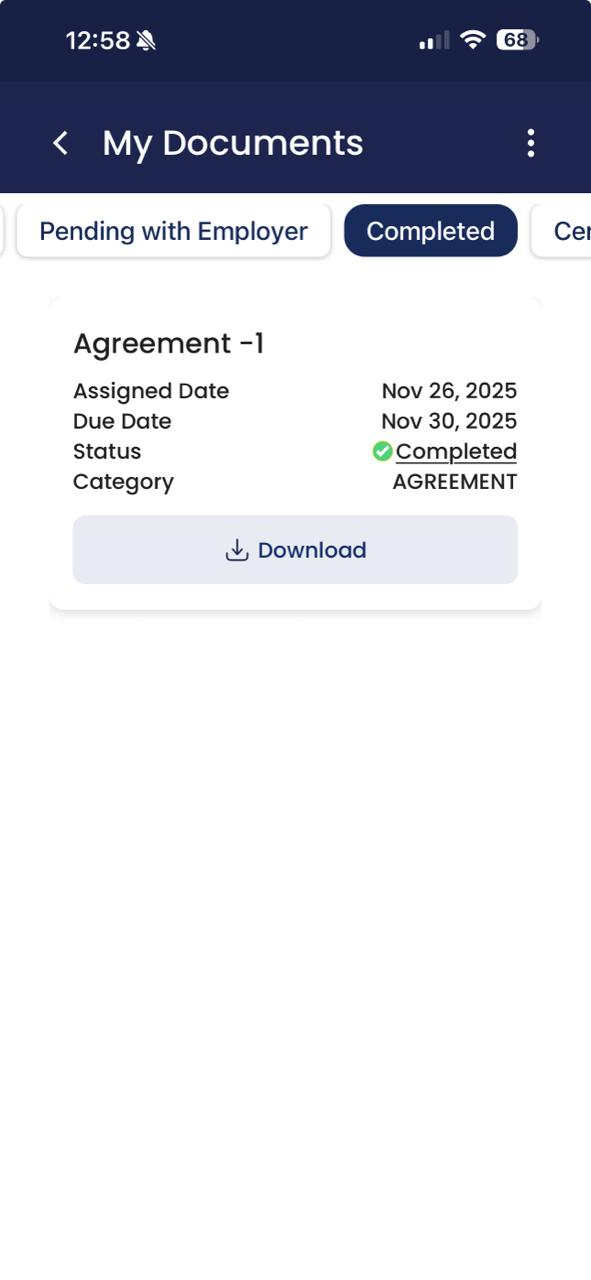
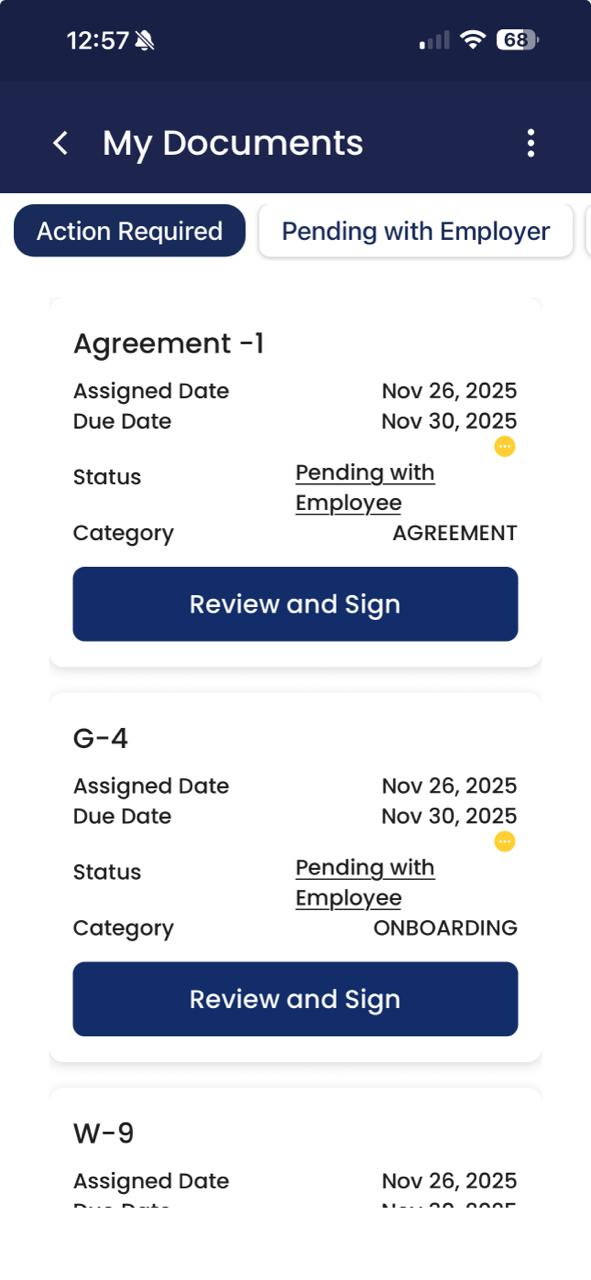
Employees can now manage documents assigned to them directly from the mobile app. They can review, sign, acknowledge, and download documents without needing to switch to a desktop. The Documents section includes four organized tabs: Action Required, Pending with Employer, Completed, and Certificates, helping employees quickly navigate and complete required actions. Documents requiring signatures support draw, type, and upload options, including font selection and previewing before signing. Push notifications for document assignments or updates are now clickable deep links, taking employees directly to the relevant document screen.
 Tasks on Mobile
Employees can now view and complete assigned tasks from the Tasks section in the mobile app. They can upload supporting documents or images if required, add comments, and submit the task for completion. Completed tasks move automatically to the Completed tab, where employees can review comments or download previously uploaded attachments. All task changes synchronize instantly across web and mobile. Task related push notifications now deep link directly to the task details, including due dates, instructions, and required attachments.
Federal Tax Withholding (W4) on Mobile
Employees can now view and update their Federal Tax Withholding (W-4) information directly from the UZIO Mobile App. A new “Federal Tax Withholding” menu item has been added under Paystubs in the mobile hamburger menu. Employees can also download a blank W4 worksheet directly to their device for reference. All edits sync immediately to employer and employee portals.
Payment Method on Mobile
Employees can now set up and manage their payment method directly from the UZIO Mobile App, without needing to log into the web portal. A new “Payment Method” option has been added under the hamburger menu (visible under the same conditions as on the web). From this screen, employees can choose between Check and Direct Deposit. When Check is selected, no additional configuration is required. When Direct Deposit is selected, employees can choose how their pay will be distributed using the “Paycheck Distribution” dropdown, which supports both Percentage and Flat Dollar allocations, just like the web experience.
UZIO Hire and Onboarding Enhancements
Mobile Responsive Login and Registration Pages for Employees
Login, registration, and account recovery pages for both Employee and Employer portals have been optimized for mobile and tablet devices. Pages now scale cleanly, with improved spacing, touch friendly controls, and clear text.
Mobile Responsive Offer Letter Workflow
Offer letters now open in a mobile responsive view. Candidates can scroll through the full offer content and sign on the same page using the integrated signature canvas. After signing, they can accept or decline the offer without extra pop ups.
Mobile Responsive Self Onboarding Workflow
The self onboarding experience has been redesigned for mobile and tablet use. Candidates can complete all onboarding steps from any device including personal information, contact details, tax forms, payment method, documents, and tasks. The layout is optimized for smaller screens, with clear step by step navigation and automatic progress saving so candidates can pause and resume later.
UZIO Payroll Enhancements
Non Discretionary Bonus Setup and Processing
The payroll module now includes enhanced support for managing non discretionary bonuses, specifically those that impact overtime calculations across past and current pay periods. With this update, UZIO now automatically calculates overtime adjustments according to applicable labor requirements.
Key Features
- Separate Bonus Periods Supported: Enter multiple non-discretionary bonuses per employee across different pay periods.
- Automatic Calculation Method: System applies Federal or CA Flat Sum method based on employee work location—no manual setup required.
- Bonus-Specific OT Adjustments: Each bonus links to its own OT Adjustment earning for clear and accurate overtime tracking.
- Flexible Entry Options: Add bonus amounts and periods directly in the payroll grid, per employee, or through bulk upload.
- Supports Both Regular & Special Payrolls: Functionality works consistently across payroll types.
- Compliance-Driven Calculations: Retro bonuses trigger recalculation for overtime adjustments using timesheets where applicable.
To learn how to configure and process non-discretionary bonuses in payroll, including setting up OT Adjustment earnings and entering bonus periods, refer to the detailed setup guide.
State Specific Withholding (W4) Form Support
UZIO now supports capturing and storing state tax withholding using each state’s official W4 form format. With this update, the tax withholding experience now:
- Captures all state required fields during onboarding or whenever an employee updates tax withholding.
- Generates each state’s official withholding form based on approved layouts rather than a generic template.
There is no change to the way tax calculations are performed. The system has always calculated tax correctly using required values. This enhancement is focused solely on documentation completeness and compliance.
Mid Pay Period Rate Change
Previously, when hourly rates were updated mid pay period, UZIO applied the updated rate to all hours worked during that pay cycle. This resulted in manual splitting and correction work in the pay period. With this enhancement, the system now:
- Automatically applies the correct rate based on the effective date of the change
- Splits hours worked before and after the change and applies each rate separately
- Applies correct rates to holiday and PTO hours based on their specific dates
- Displays separate rate rows in payroll grid, paystubs, payroll registers, and reporting for full transparency
- Supports multiple rate entries via the updated Add Earnings to Payroll Grid API when a rate effective date is provided
Example
Rate changed from $20 → $22 effective October 7 (mid-pay period).
- Hours worked before Oct 7 are calculated at $20/hour
- Hours worked on and after Oct 7 are calculated at $22/hour
Workflow Enhancements
The payroll grid will now display hours against the applicable rates in the multi-job/ rates window.
The earning template has been updated to allow multiple rows for the Primary Job when different rates exist within the same pay period. Payroll screens, paystubs, and the payroll register will also reflect these separate rows for transparency.
The Add Earnings to Payroll Grid API now also supports posting hours tied to multiple pay rates. A rate effective date is required only when more than one rate applies within the same pay period. If you do not process multiple rates, nothing changes for your workflow.
Was this article helpful?
That’s Great!
Thank you for your feedback
Sorry! We couldn't be helpful
Thank you for your feedback
Feedback sent
We appreciate your effort and will try to fix the article