In this release, we have introduces a wide range of new features and improvements across Time Tracking, Time Off, Payroll, Mobile and Employee profile modules, each designed to simplify operations, strengthen compliance, and enhance the user experience.
If you have any questions or feedback regarding these new features or improvements, please feel free to email us at support@uzio.com.
The UZIO Mobile App has also been updated in this release with the enhancements to the time tracking system. Users who have enabled auto-update will see the new features automatically on the date, while other users will be required to update the mobile app before use.
To learn more about our last release from August 2025, click here.
Quick Links
UZIO Time Tracking Enhancements
- Missed Break Calculation and Premium Logic
- Break Notifications
- Prevent Employee Taking a Break Till the Defined Time
- Shift Scheduling Notifications
- Time Attestation
- Long Running Time Entry – Configurable Reminder Settings
- Missed Clock-Out Punch – Allow Employees to Clock In for the Next Shift
UZIO Kiosk and Mobile App Enhancements
- Biometric Login (Facial Recognition on Kiosk)
- Biometric Authentication (Fingerprint/Face/Pin on Mobile App)
- Offline Time Tracking Capabilities
- Push Notifications of Documents and Tasks on the Mobile App
- Personal and Contact Pages on the Mobile App
- Polygon Geofencing
UZIO Time Off Enhancements
- Automatic Reversal of PTO Accruals on Void Payroll
- Automatic PTO Balance Payout on Employee Termination
- Adjusted Service Date for Accurate Time-Off Calculations
- Automatic Proration for Rehired Employees
- Preventing Retroactive PTO Accruals when Employees are Assigned Late to a Policy
UZIO Payroll Enhancements
- Enhanced State Tax Setup and Withholding Experience
- Voluntary Life Deduction Enhancements
- Holiday Premium Pay for Overtime Hours
UZIO General Enhancements
UZIO Time Tracking Enhancements
Missed Break Calculation and Premium Logic
Previously, when an employee worked an 8-hour shift and had already taken one rest break, the system did not flag the second rest break as missing. This caused such entries to appear fully compliant even though an additional rest break was still due based on the shift length.
With this update, UZIO now determines when an employee is owed a break or premium more accurately by comparing the number and timing of eligible breaks versus the breaks actually taken, based on the organization’s configured break rules. For example, if an employee works 8 hours, they are eligible for two rest breaks. As per the break rule setup, if they take only one, UZIO will mark the second as a missed rest break and automatically apply the premium pay accordingly.
Additionally, the system now detects when a meal or rest break begins after the permitted time threshold and flags it appropriately in the system. If a break starts later than the defined limit for compliance, the system will flag it as a missed break and apply the premium pay as per the organization’s configured break rules.
Break Notifications
UZIO now enables employers to send timely reminders to employees and managers when it’s time to start, end, or take a required break. These proactive alerts help ensure breaks are taken within the required time window, keeping the business compliant and avoiding potential penalties for missed breaks.
Notification Types:
- Start Reminder – Sent if the employee has not begun the break by the end of the eligible window minus the break duration.
- End Reminder – Sent shortly before the scheduled break duration ends.
- Missed-Break Alert – Sent when a break window expires without a recorded break as per the break rules configured. Alerts can notify both the employee and the manager.
Administrators can configure notifications per break rule within Time Tracking Settings → Break Rules and choose the preferred delivery channels.
Prevent Employee Taking a Break Till the Defined Time
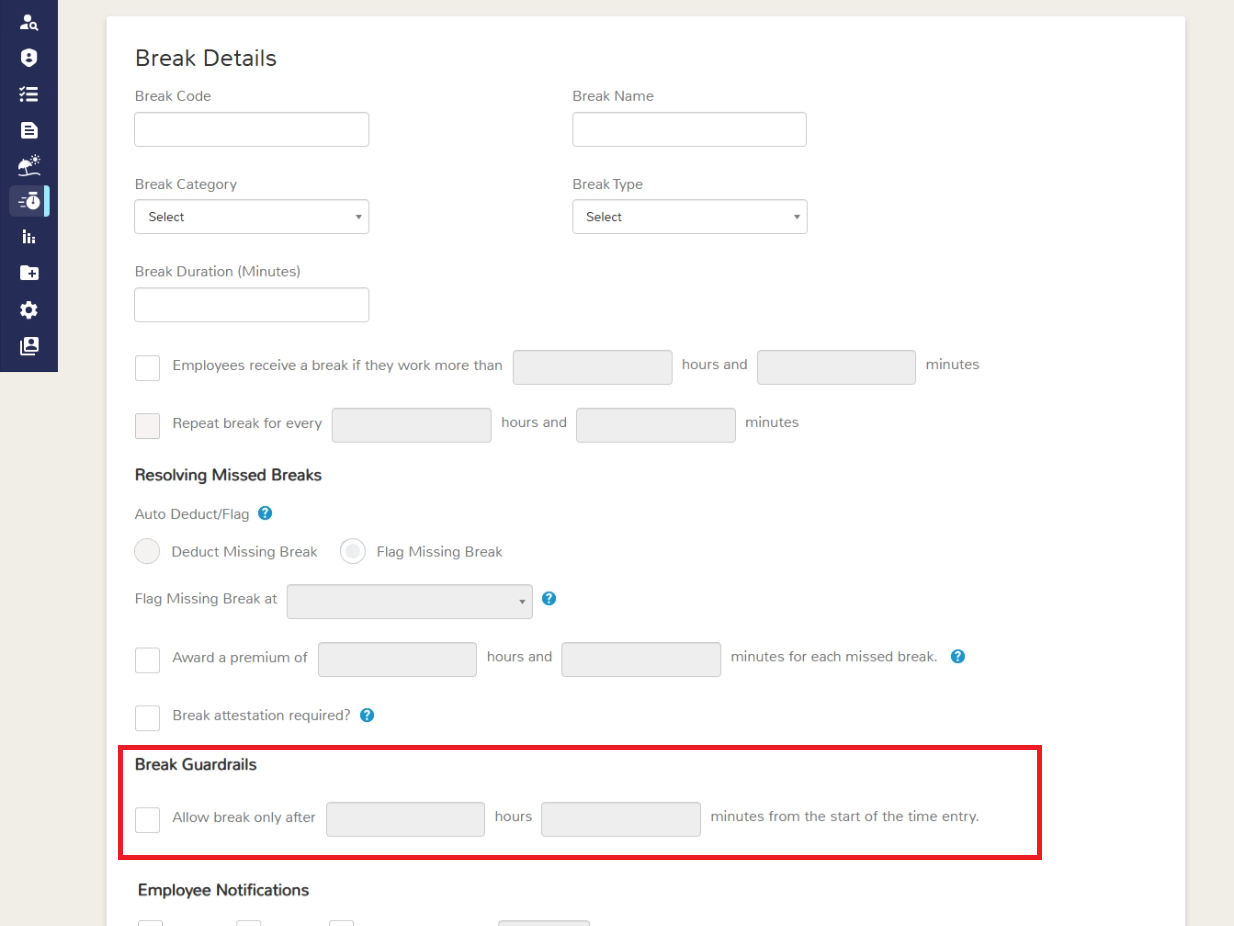
UZIO now offers a break-level control that prevents employees from starting a break too early in their shift. This supports business policies where employers don’t want breaks taken before a minimum number of hours are worked.
Administrators can configure this rule at the break rule level using the setting:
“Allow break only after [__ hours __ minutes] from the start of the time entry.”
For example, you can set the system to prevent meal breaks before the 3rd hour of a shift. This enhancement helps maintain proper break owed timing shouldn’t be before the 3rd hour.
Shift Scheduling Notifications
UZIO has enhanced the shift-related notifications. The newly launched notifications are sent via Email, SMS, and Mobile Push. You can configure them on the Shift & Scheduling setup screen—choose which alerts go to employees and managers, and via which delivery channels.
Employee notifications
- Clock-in variance: Alert if the employee clocks in early/late relative to the configured window from the shift start time.
- Clock-out variance: Alert if the employee clocks out early/late relative to the configured window from the shift end time.
- No-show: Notify when the employee does not clock in for an assigned shift.
Manager notifications - Mirrors the above for direct reports.
Time Attestation
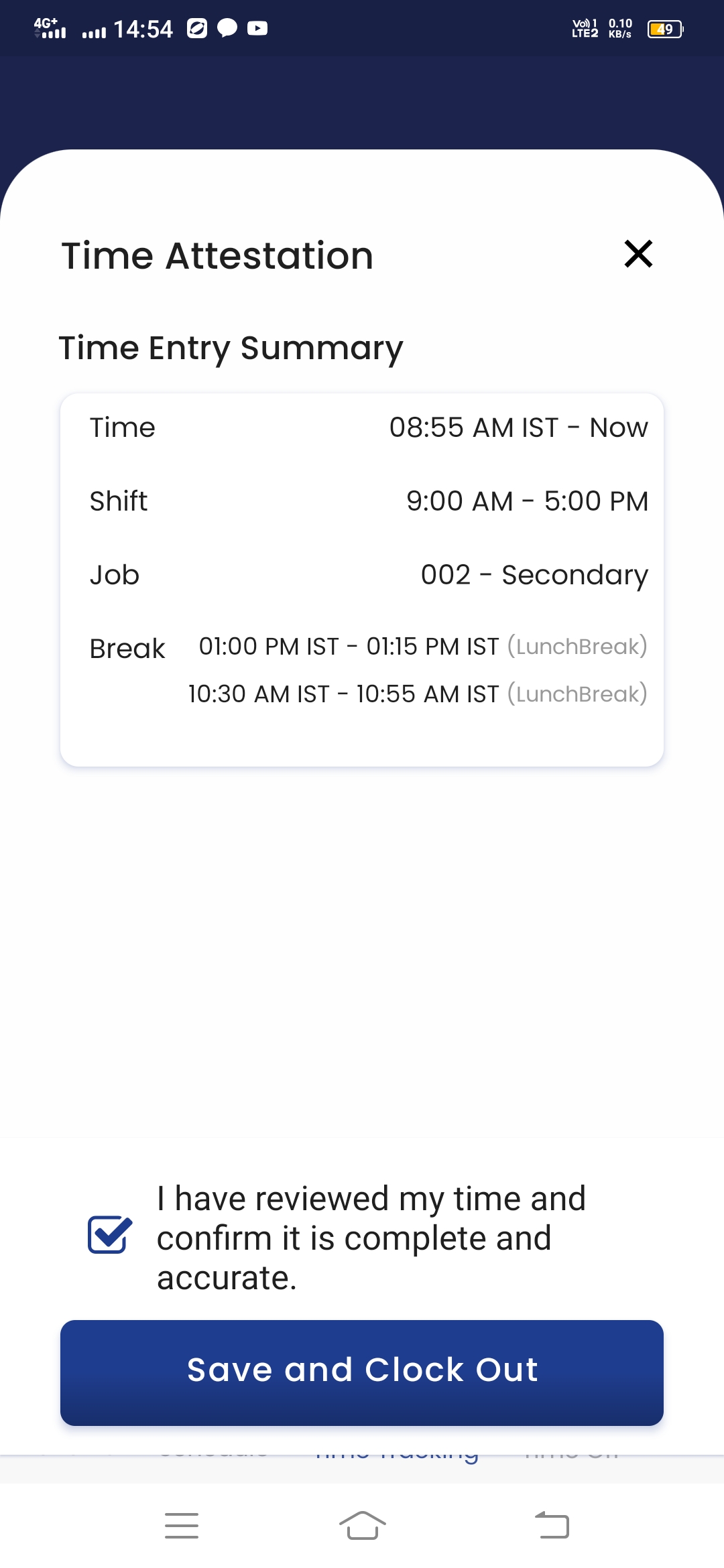
UZIO now allows employers to require employee time attestation at the point of clock-out for better accuracy and record keeping. When enabled, employees are prompted to review and confirm a summary of their clock-in/out times, breaks, shift, and job details before ending their shift. The employee reviews this information and attests that it is correct. Each attestation is securely recorded in the system for audit tracking, providing greater transparency and supporting compliance documentation.
This setting is turned off by default and can be enabled. Employers can also set up reminders for entries that remain Not Attested and select preferred communication channels — SMS, Email, or Push Notifications.
You can enable this feature under: Time Tracking Settings → Time Clocks → Require Time Attestation by Employees.
 Long Running Time Entry – Configurable Reminder Settings
Previously, the system sent two fixed reminder emails when an employee’s time entry remained active for an extended period. These reminders were automatically sent to both the employee and their manager, with no option to modify the timing or delivery method. With this update, UZIO now gives employers full control to configure the timing and delivery channels for these reminders. You can decide when each reminder should be triggered and how it should be delivered — via Email, SMS, or Push Notification.
You can enable this feature under: Time Tracking Settings → Time Clocks → Email/SMS/Push Notification
- First Reminder: “Send the first reminder after [__ hours __ minutes] of a running time entry.”
- Second Reminder: “Send the second reminder after [__ hours __ minutes] of a running time entry.”
This enhancement provides greater flexibility to align reminder timing with your organization’s time tracking policies and ensures employees and managers are promptly notified before a time entry runs excessively long.
Missed Clock-Out Punch – Allow Employees to Clock In for the Next Shift
Previously, if an employee forgot to clock out from their previous shift, the system prevented them from clocking in the following day until the earlier entry was corrected. This often caused unnecessary delays and disrupted shift start times. With this update, UZIO introduces a configurable grace window that allows employees to clock in for a new shift even if a previous clock-out is missing. By default, this window is set to 24 hours. After the defined number of hours from the start of the previous shift, the system will automatically flag the earlier entry as “Missing Clock Out” while still allowing the employee to clock in for their next shift.
The employee or manager can later update the correct clock-out time to maintain accurate and complete time records. This enhancement helps keep operations running smoothly while ensuring all time data remains clean, traceable, and compliant.
You can configure or modify this setting at: Time Tracking Settings → Time Clocks → Flag Missing Clock Out after [__ hours] of start time.
UZIO Kiosk and Mobile App Enhancements
Biometric Login (Facial Recognition on Kiosk)
UZIO Kiosk now supports Face Login alongside traditional PIN entry, giving employees a faster and more secure way to clock in and out. This enhancement helps offering a faster and secure alternative to PIN-based authentication, while maintaining compliance with biometric-consent standards. Please refer to the link for more details.
Biometric Authentication (Fingerprint/Face/Pin on Mobile App)
UZIO now supports an optional biometric unlock to add a quick security check whenever the app is reopened. This protects sensitive data if a device is shared or left unattended—without forcing full re-login every time.
How it works
- First, the employee signs in to UZIO via password or social login (normal authentication).
- From the hamburger menu, the employee taps “Biometric Login” to turn on the feature.
- After activation, each time the app is launched or brought to the foreground, UZIO prompts for the device’s biometric/PIN/pattern before granting access.
- Fingerprint and Face unlock are supported, using the device’s native, secure hardware (e.g., iOS Face ID/Touch ID; Android biometrics).
- If biometrics are unavailable or temporarily fail, the app will accept the device’s PIN/pattern as configured at the OS level.
- The device must already have a screen lock set up (biometric and/or PIN/pattern).
- The unlock prompt appears on reopen/launch (not on every screen change), keeping the flow fast.
Offline Time Tracking Capabilities
UZIO Time Tracking now operates seamlessly in offline mode, ensuring time is captured even when connectivity is unavailable or unstable. Employees can record Clock In, Clock Out, Break In, and Break Out without the internet, and the app will reconcile entries as soon as the device is back online.
How it works
- Continuous capture: If a connection drops, the app automatically switches to offline capture and continues to log time events locally.
- Auto-sync on reconnect: When connectivity returns, entries auto-sync within ~10–15 seconds.
- Unified records: All offline events appear alongside online entries in the Timesheet (mobile and web), so employees and managers see a single, consolidated history.
- Validation at sync: The server validates entries (e.g., no overlapping segments, shift rules, break rules) and flags conflict for review.
- Conflict handling: If an offline entry conflicts with existing records (e.g., duplicate clock-in), the system shows the conflict at the device only. The employee can fix the conflict on the device and once the conflict is resolved then the entry gets synced automatically.
This feature is configurable under Time Tracking Settings -> Time Clocks -> Enable employees to track time without an internet connection?
This enhancement delivers resilience, accuracy, and compliance—so time is captured reliably, regardless of connectivity.
Push Notifications of Documents and Tasks on the Mobile App
UZIO has started sending the PUSH notifications of documents and tasks of employees on the mobile app.
Personal and Contact Pages on the Mobile App
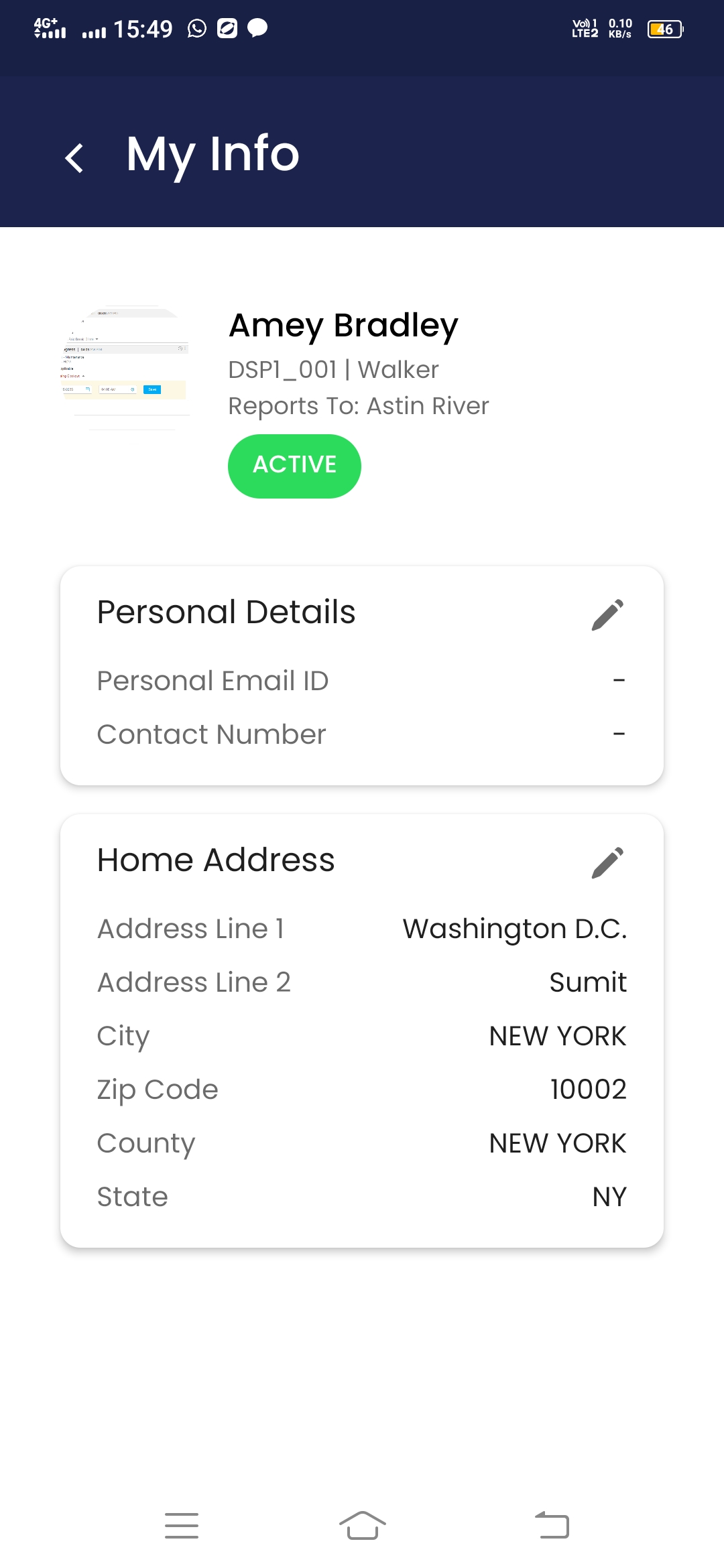
The UZIO app lets employees view and update their own information. From the hamburger menu, tap your name to open Profile, which includes two sections:
- Personal Details – Personal Email ID and Contact Number.
- Home Address Details – Address Line 1, Address Line 2, City, State, Zip and County.
Employees can edit either section and save changes to keep their records current
Polygon Geofencing
Previously, UZIO’s geofence used a circular boundary around a worksite. While simple, circles often spill over into streets, neighboring lots, or public areas—letting employees clock in outside the true premises. To address this, UZIO now supports polygon geofencing. Employers can draw precise, multi-point boundaries that match the actual site layout (irregular plots, multi-building campuses, loading bays, etc.). Any employee outside the polygon is blocked from clocking in.
UZIO Time Off Enhancements
Automatic Reversal of PTO Accruals on Void Payroll
Previously, when a payroll was voided, PTO accruals added during that payroll remained in the employee’s balance. Users had to manually create adjustment entries to correct the totals, which was error-prone and time-consuming. With this update, the system ensures full synchronization between payroll and time-off balances by automatically reverting any PTO units accrued through the voided payroll.
Please refer to the link for more details.
Automatic PTO Balance Payout on Employee Termination
Managing an employee’s final payout can often involve manual calculations for PTO and unpaid hours, which can delay same-day processing and introduce errors. With this enhancement, the system now automates the payout of eligible PTO balances and timesheet hours when an employee is terminated — improving accuracy, compliance, and user experience.
This update introduces:
- Enhancements to the Employee Termination Workflow
- A new “Balance Payout on Termination” setting in Time Off policies
- A system-seeded earning type called PTO Balance Payout
- Automatic syncing of PTO balance payouts during regular and special payrolls
Please refer to the link for more details
Adjusted Service Date for Accurate Time-Off Calculations
Time-off calculations were previously tied only to an employee’s Date of Hire (DOH). This created challenges for clients who needed accruals to reflect an employee’s original service or rehire history. To address this, a new field—Adjusted Service Date—has been introduced to provide greater flexibility and accuracy.
In some cases, time-off accruals and anniversaries need to be based on an employee’s earlier service rather than the most recent hire date. For example:
- Rehires within six months: Employers may want to honor prior service when calculating accruals and work anniversaries.
- Eligibility changes: When an employee moves from part-time to full-time, accruals should align with their new eligibility, not their original hire date.
The new Adjusted Service Date field helps address these scenarios without manual adjustments.
Please refer to the link for more details.
Automatic Proration for Rehired Employees
When an employee is rehired and assigned a time off policy, the system will now automatically prorate their initial balance — eliminating the need for manual adjustments. This enhancement ensures accurate and consistent accrual calculations for rehired employees.
With this enhancement,
- The system will automatically apply proration whenever the proration flag is enabled in the time off policy.
- Proration will be calculated based on the employee’s latest Date of Hire (DOH) or Adjusted Service Date.
Preventing Retroactive PTO Accruals When Employees Are Assigned Late to a Policy
In some cases, employees are assigned to a Paid Time Off (PTO) policy much after the policy’s effective date. Previously, the system calculated accruals retroactively from the employee’s Date of Hire (DOH), which resulted in accruals for past years. This enhancement ensures that accruals begin from the employee’s policy assignment date rather than retroactively applying to prior policy years.
With this enhancement, accruals will start from the policy assigned date instead of the employee’s DOH when an employee is assigned late to a policy.
UZIO Payroll Enhancements
Enhanced State Tax Setup and Withholding Experience
Previously, all states—including home location states—automatically appeared on the company’s State Taxation screen if the employer was withholding home taxes for any employee in that state. Employers had to enable the “Pay Home Tax” option for each employee individually before completing the company-level setup. Now, only work location states appear by default. Home location states must be manually added at the company level if any employee resides there. Once added, the corresponding state automatically appears on the withholding screen for all affected employees, eliminating the need to enable home tax withholding individually. Additionally, when employees have different work and home locations, the system now manages separate tax sections for each. Work Location fields always remain visible, while Home Location fields appear only if the employer is registered in that state. To ensure compliance, employees must acknowledge their tax withholding information when saving.
Voluntary Life Deduction Enhancements
To meet the requirement of processing Voluntary Life Insurance at the individual member level, UZIO Payroll has been enhanced to support syncing premiums separately for Employee, Spouse, and Child coverage. Previously, the system only synced a combined Voluntary Life amount from the Benefits module.
System Setup
The following six new system-seeded deductions are now available and automatically added as part of this enhancement
- Voluntary Life Employee, Spouse, and Child – Pre-Tax
- Voluntary Life Employee, Spouse, and Child – After-Tax
Setup Rules & Restrictions
To prevent duplication between the existing combined Voluntary Life deductions and the new member-level deductions, the following validation rules apply:
- If a combined Voluntary Life (Pre-Tax or Post-Tax) deduction is already added with Auto Sync = Yes, none of the new individual deductions can be added with Auto Sync = Yes.
- The same deduction can still be added with Auto Sync = No.
- The reverse is also true—if any member-level deduction (Employee, Spouse, or Child) is added with Auto Sync = Yes, the combined version cannot be added with Auto Sync = Yes.
This enhancement ensures employers requiring member-level payroll processing for Voluntary Life can now do so seamlessly, maintaining accuracy between the Benefits and Payroll modules.
Holiday Premium Pay for Overtime Hours
Some employers offer premium pay for employees who work on holidays. Previously, when a holiday premium was enabled, the system applied the premium rate to all hours worked on that holiday — including overtime (OT) and double overtime (DOT) hours. To provide greater flexibility, a new setting has been introduced to help employers decide whether overtime hours worked on holidays should also receive the holiday premium rate.
What’s New
When the “Do you pay Holiday Premium” flag is set to Yes, a new question will now appear in the holiday policy setup:
Options:
- Yes (default): Overtime and double overtime hours worked on a holiday will also be paid at the holiday premium rate.
- No: Only regular hours worked on a holiday will be paid at the premium rate. Overtime and double overtime hours will be paid at the standard rates (1.5x and 2x respectively).
- In Time Tracking and Payroll screens, holiday premium hours will reflect regular hours only.
- OT and DOT hours worked on holidays will appear under their respective Overtime and Double Overtime sections.
UZIO General Enhancements
Employee Profile Enhancements
We are introducing several improvements to the Employee Profile to enhance data accuracy, configurability, and usability.
Field Renaming and Categorization
To improve clarity and align with HR and compliance standards, the following field name changes are being made:
- Employment Type I to Employment Type
- Employment Type II to Employee Type
- Employment Classification I to Union Classification
- Employment Classification II to FLSA Classification
History Tracking for Key Fields The system will now also capture effective dates for the following job-related fields:
- Employee Type Union Classification, FLSA Classification
- Custom Fields under Additional Information
- Each custom field will now track changes with an effective date.
- When a custom field is added or modified, a pop-up will appear prompting for the effective date.
Reporting Manager Bulk Upload
The Reporting Manager ID (Optional) field will now be part of the employee census upload template.
- The system will accept only valid IDs associated with active employees.
Multi-Select Custom Field Type
The custom field framework will now support a Multi-Select Dropdown option.
- The existing “Dropdown” type will be renamed to Single Select Dropdown.
- This new type allows users to select multiple values where applicable.
New System-Seeded License Fields
New system-seeded custom fields will automatically appear under Additional Information → License Details for all employers (existing and new).
Was this article helpful?
That’s Great!
Thank you for your feedback
Sorry! We couldn't be helpful
Thank you for your feedback
Feedback sent
We appreciate your effort and will try to fix the article